Customers - Requests
The Submission System allows Customers to manage their requests with clarity and surety. It makes communicating with the writers simple, allowing for articles to be submitted specifically for particular requests, which when they have passed the editor's muster, will appear automatically in your queue. Follow the steps below to see how the new system will make life content management easier and more efficient for our consumers.

Submitting a New Request
- Login to your customer account
- Click on My Requests
- Then choose New Requests
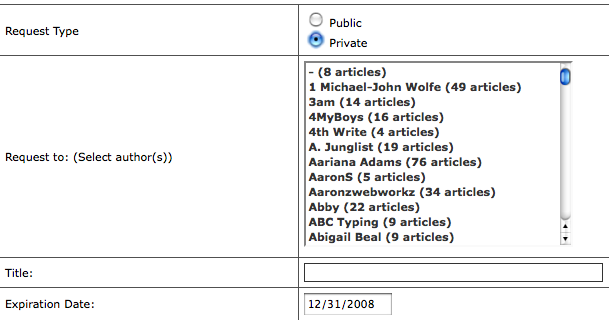
- Once in the submission form everything is self-explanatory. If you select the Private button, a drop down will appear allowing you to select whichever author(s) you would like to specifically be contacted to do the work. Use CTRL to select multiple authors. If you can’t find an author contact support, though it will usually mean that the author hasn’t yet sold enough articles to be included in our author list.
- You’ll notice that there is a choice for an expiration date, which if you don’t choose to set yourself will automatically give you three weeks and then the request will close. Don’t worry you can edit at any point and extend the life of the request.
To submit a public request or private request:
Managing Your Requests

- Once you have a request submitted you can view all your requests in a dashboard by clicking on My Requests
- This page gives you options to view, edit, close or delete your requests.
- Closing a request leaves the option to reopen it and all the various things that are linked to the request; whereas deleting the request means that it is gone permanently.
- By clicking in the name of a request you will be able to see the details of the request and any articles that have been submitted.
- Editing the request will allow you to extend the expiration date, or add additional notes to the request to provide greater instructions to the authors writing for the request, or even change the price if you have set it too high for you budget or too low for the level of work you are asking for.
- This will also allow you to view the status of the request, which is the same status that the writers see from their end.
- Click the name of the articles submitted to the request you can purchase the article, view its long description or delete it from your perspective purchases. You can also email the author with notes, or specific direction, this is also where you can download your purchases once you have paid for the article.
Using Your Inbox to Track Your Requests
By clicking on the inbox you will be able to see all the articles that have been sent to you for particular requests in your request queue.
This is good place to communicate with your writers and to see the various emails that have been sent you regarding site information or queries about your request from authors. Often before a writer will begin working on a requested article they will have some questions about the request. This is the place that they will send those questions to.